
Every year, Dodo Brands holds an internal awards program called Dodo Prime. It's a format where teams from the management company showcase their projects, vote for each other, and pick the best case studies. For Dodo, it's a chance to showcase real business challenges, product launches, research, and services. For employees, it's excitement, a bit of competitive spirit, and healthy vanity. It's a chance to put yourself out there, show what you're working on, and see what your colleagues are up to.
We were brought in to organize the voting so that it would be convenient for everyone. The client wanted to move away from manual data collection, get rid of 200-slide presentations, and finally do everything the "human" way — more conveniently than a Google Form.
Spoiler: along the way we decided not just to build a landing page on Tilda, but to create a full platform:
— with corporate email login,
— an attractive presentation of projects,
— convenient navigation across categories,
— the ability to watch and analyze results as voting happens.
.png)
At the start, we broke down how the voting was organized at the time. It was a landing page that, on launch day, redirected users to a Google Form, and to figure out who to vote for, you had to open a huge presentation with no navigation. Users had to scroll through it themselves, remember who they liked, and go back to the form to vote. Complicated and inconvenient.
We considered two options for the new voting platform, each with its own pros and cons.
Relatively simple but one-off: build the voting page as a landing page on Tilda.
・Pros: cheap and easy, since it's familiar and you can always "nudge the pixels" on each individual project.
・Cons: dependence on the platform, workarounds, limited functionality, and a temporary fix — meaning this story has no sequel.
Complex but promising: build our own small web service from scratch, where everything is automated and easy to configure.

・Pros: flexibility, independence from any platform, easy data handling, personalization, gathering and updating information in one admin panel, accounting for all current requests, and room for further growth.
・Cons: slow and expensive. On top of that, the main challenge was that we'd have to build our own platform from scratch by hand, in a situation with limited resources — including people and time. Still, for an agency, this step is a great growth opportunity. New horizons? Sign us up...
We chose to build the second option, because we realized we needed an internal tool that would grow alongside the awards program and be managed in-house, like our own product.
Dodo Prime runs every year — the mechanics, interface, and admin panel stay the same. All you need to do is add new content within an already defined structure, and the old content stays permanently in the database, which is valuable too. In other words, invest once, and in following years you can launch without a headache.
On top of that, the mechanics we built once can run any kind of voting with any design — the platform is ready for it. A great investment, right?
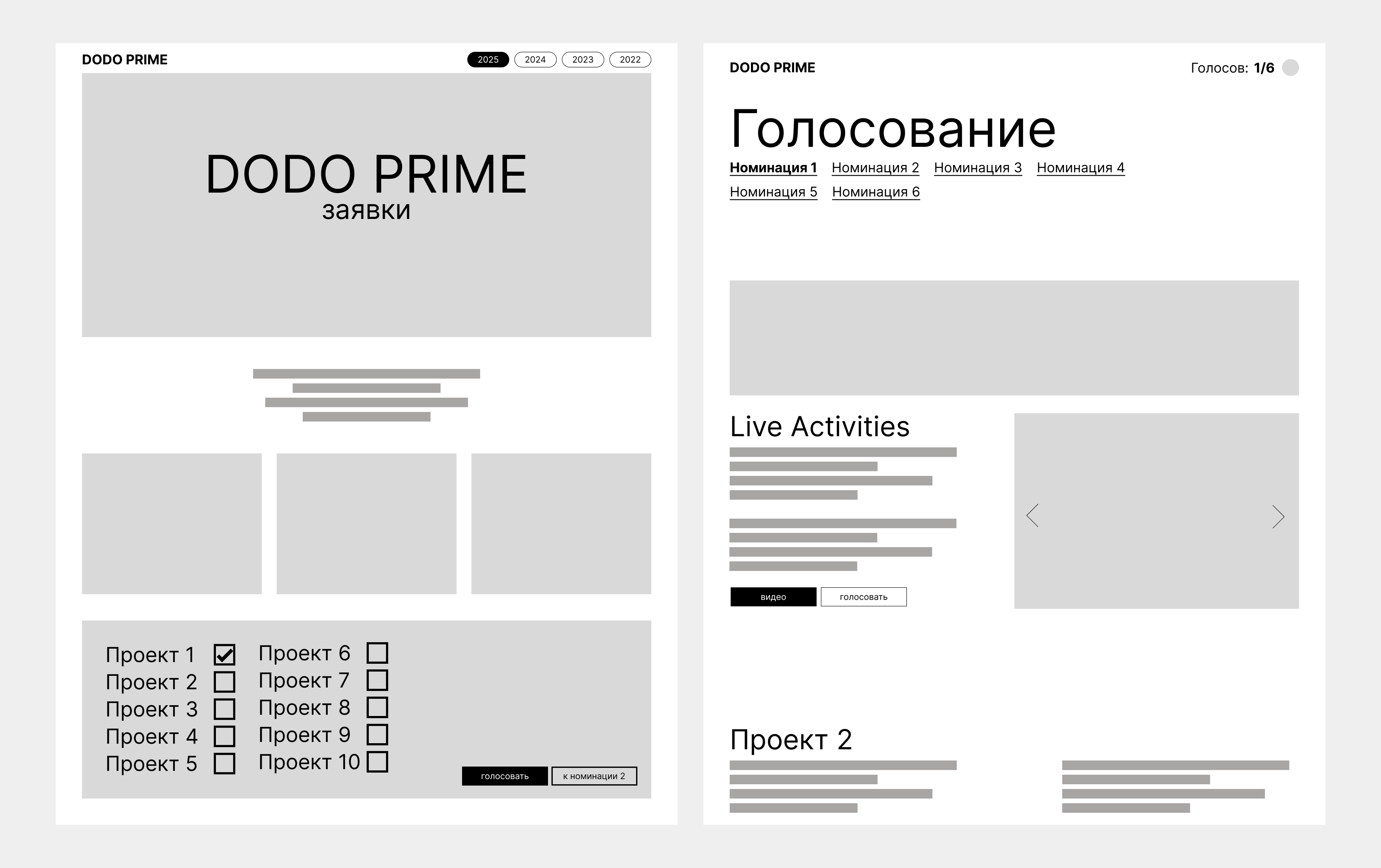
Backend and admin panel
We started with the basics — we gathered everything left over from last year's voting: the structure, presentations, list of categories, design. Next, we integrated Google login into our service so participants could sign in with their corporate accounts.
We built the service around a three-level structure (award / category / project), with the project as the core, final element containing internal details. Some of the admin panel's functionality we simply had to "guess" as we went, trying to make it convenient and flexible. For example, we built in the ability to move a project between categories from the start, which came in handy during the last-minute rush to fill in projects before voting launched.
In the admin interface, we focused on what mattered most to the user, giving the ability to edit text, images, links, and descriptions. Organizers could see what was happening in real time: how many votes had come in, when voting would end. And thanks to settings in the admin panel, voting automatically switched modes and ended on a set date without any extra manipulation. For example, right now it simply displays the projects with voting disabled.
User interface
This was the most sensitive stage, since the main voting page is what every employee interacts with. We went through several visual concepts before arriving at the final one. We paid special attention to navigation. At some point we realized: don't overcomplicate it — the page needed to be compact, with everything within reach.
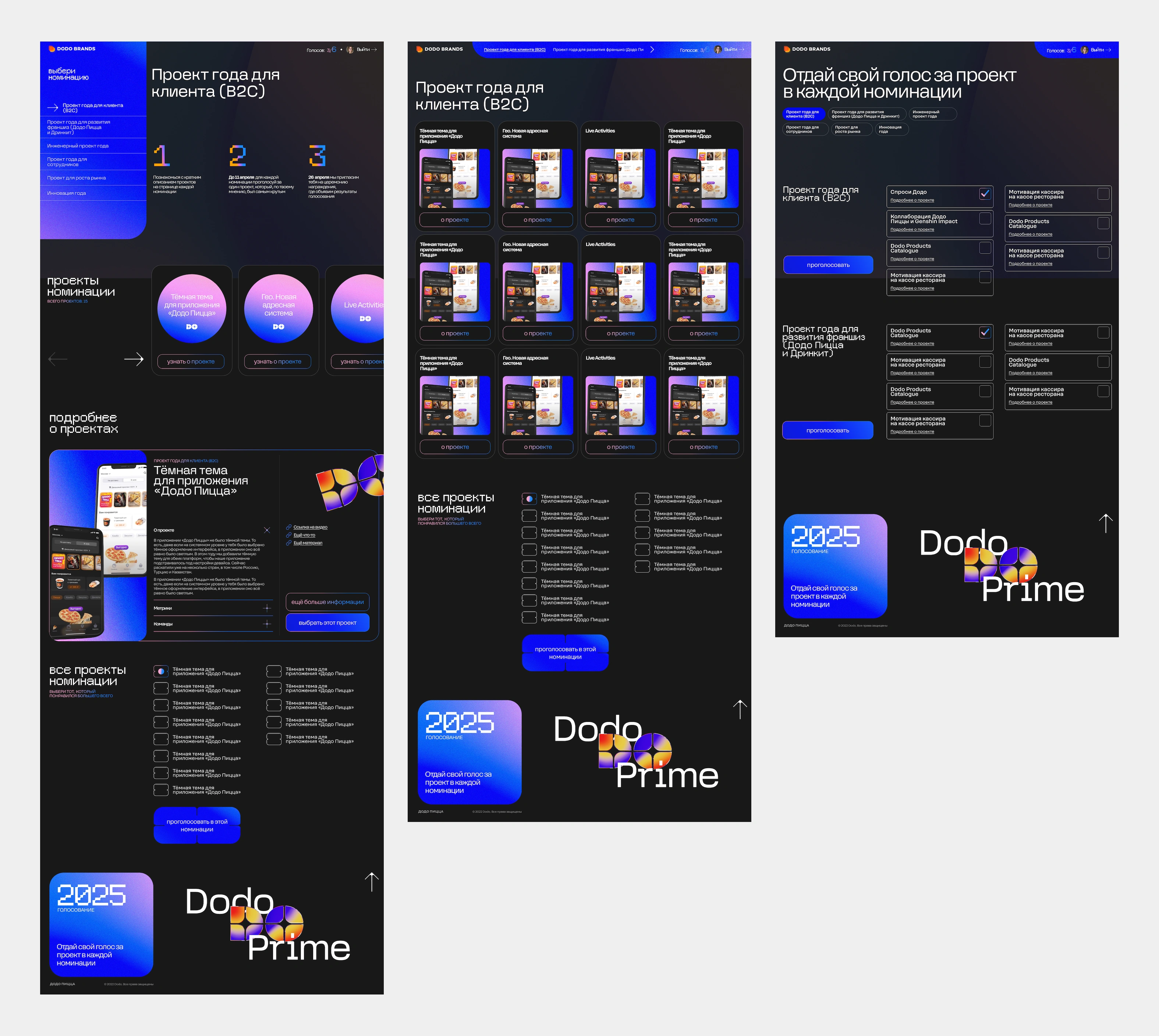
We made a badge with an avatar that shows how many categories are left to go through. We built in the ability to vote gradually: today if you want, or come back tomorrow if you'd rather. All votes are saved, and you can change your choice and vote for a different entry. It was important to shorten the path to action — you could check a box right from the card, or from the project list by name alone.
We adapted the interface to reality: projects could have anywhere from one to five images, and sometimes only a partial description. We had to clean up a lot on the fly — from unexpected scenarios to rare bugs. For example, someone would check boxes but never hit "submit" — so we refined the platform's responses to make sure nothing got lost.
Deployment and launch
Content arrived at the last minute, but that's classic. We didn't wait — once the service was deployed on the server, we started filling the database as new information came in. We added projects to the admin panel ourselves, checked how descriptions displayed, how the logic worked. We tested everything on the fly, spotted issues, and fixed them quickly. This wasn't a "deliver and disappear" job — we stayed close by right up to launch.
The timeline for a project this complex was quite tight (a month and a half for a single person doing both full-stack development and design), leaving no time to test on real data.
We didn't have precise information about the projects: how many there would be, how much text each might have, and there was no image standard. At the same time, it was a fairly large volume of information with a lot of projects competing in the voting.
Image formats: each project could have a different number and format of images. We tried to plan for different scenarios — 1/2/3 or more images — so everything would display well and stay consistent, but the variety of materials still outpaced our foresight.
User behavior turned out to be unpredictable (for example, some people preferred to check all the boxes first and then hit the vote button), and we were able to fix some of these issues quickly in the first days and even hours of voting, while others were left for later.
We built a web service that can keep being used going forward for other purposes at the company, instead of inventing a new platform every year — by developing and evolving the existing one. Today it solves just one task — collecting votes and basic results analytics — but at any point we can connect application collection, automatic moderation, analytics, and visual reports.
Even at this stage, the voting page ended up doubling as an event archive, where, once results were in, you could browse all the projects with voting disabled.
From a Google Form paired with a long presentation, we arrived at a neat, comfortable, and above all secure service of our own. Everything runs and is stored on the company's own servers, not on a third-party service.


For participants and the organizing team alike, it's a convenient, clear interface where everything is understandable, manageable, and good-looking.
Project team
Art direction — Zhenya Oputin
Design and development — Dasha Shkuratova
Case design — Sonya Grigorieva
Case animation — Timur Yakupov
Case editor — Misha Kurnosov
